The benefits of generative AI, or how I made my own UI framework
How my experience with Eclipse, a Java-to-Go translator, and working with agents helped me build gowt.
I may have mentioned this before, but early in my career I worked extensively with Java. First I helped build a Python debugger for an Eclipse-based IDE, then I started the Dynamic Languages Toolkit project using Eclipse technologies, including the Standard Widget Toolkit.
At one point a customer needed me to take Eclipse Workbench apart. They wanted to configure visibility and workspaces for different deployments and users. Different people needed different actions. Everything came from the server after login and had to be swapped dynamically in Eclipse’s plugin model. I spent a lot of time inside its internals.
Then using the automation tools became painfully frustrating. They were really dumb at the time. After discovering AspectJ, I had an idea: why couldn’t we wait until the system settled and click like a user?
That led to Q7, which eventually became RCPTT, an official Eclipse project. It was the second project I helped bring into the Eclipse world. This time I had to dig deep into Eclipse.
The system was stable and convenient. It had many concepts that are still uncommon. For example, we introduced contexts, which put Eclipse into a particular state: files, settings, plugin state, and so on.
A test could then check a small piece of functionality on top of that prepared context. You could set up a project and data, press a button, and record the context. After that, scenarios could be reproduced reliably every time.
In several cases, users hired a junior developer part-time, and that person used the system to cover complex products with tests on their own. Quickly and well.
What does this have to do with anything? SWT is cross-platform by design. Unlike Swing, it used native controls, which was a real advantage. Eclipse looked better than its competitors in those days. In 2024, Initiative 31 set out to modernize SWT, improve the appearance and customization of interfaces, and reduce maintenance costs. Interestingly, it is still alive.
But that was all an introduction :-)
Over the past year I returned to Go and helped with a project controlling robots. I started wondering: how can I make Go applications for all platforms, beyond TUIs?
For Intabia Platform, we are in the middle of a back-and-forth with Apple to release our app. Much of it is written in Go: gomobile plus Swift and Kotlin for small platform wrappers. Modern agent workflows in action: what used to be really hard can now be built and maintained by one person, or several - company is always more fun :-)
I also built a CLI, a TUI, and an MCP client for the Platform on the same base. One codebase, lots of applications. I plan to run small Go services based on the client, and to publish the Go client itself within the next month, making it easier for services to work with the Platform. It shouldn’t all be Node.js and browsers.
There were fun challenges there too. The Platform uses WebSocket, msgpackr, and Snappy compression, so I had to port msgpackr too. I should publish that as well :-)
So I started wondering what Go had for desktop applications. Bubble Tea is decent for TUIs, but agents have a hard time understanding it. Describing what you want is genuinely difficult.
I had been thinking about interfaces for a long time. Those thoughts go back to 2012, and there were implementations of RCPML (Rich Client Platform Markup Language), where you define forms in XML. Back then it felt like, wow, React was still in diapers :-)
I had another attempt too: MOB, a Java interface builder. I wanted the code to show what widgets it would produce, without a variable for every label and button.
Here is a shortened example of creating widgets with ordinary SWT. I kept only the form construction, without data bindings or handlers:
Shell shell = new Shell(display, SWT.NONE);
GridLayoutFactory.swtDefaults().numColumns(2).applyTo(shell);

Label userLabel = new Label(shell, SWT.NONE);
userLabel.setText("User name:");
Text userName = new Text(shell, SWT.BORDER);
userName.setText("Initial value");

Label passwordLabel = new Label(shell, SWT.NONE);
passwordLabel.setText("Password:");
Text password = new Text(shell, SWT.PASSWORD);

Button okButton = new Button(shell, SWT.PUSH);
okButton.setText("OK");
Button cancelButton = new Button(shell, SWT.PUSH);
cancelButton.setText("Cancel");

shell.open();
And here is a shortened example of what I proposed in MOB:
MOB mob = new MOB();

mob.window("MyWindow")
    .label("User name:").text()
    .label("Password:").text()
    .button("OK").button("Cancel");

mob.show();
This is an API sketch. The idea was to make the form structure readable directly in Java.
Then I imagined what it might look like in Go:
package main
import (
	"log"
	"github.com/haiodo/gowt"
)
func main() {
	err := gowt.Run(func(app *gowt.App) {
		w := app.Window("Hello",
			gowt.Label("Hello, gowt"),
			gowt.Button("Quit", gowt.OnClick(app.Quit)))
		w.Show()
	})
	if err != nil {
		log.Fatal(err)
	}
}
I thought: why not make my own Go framework? SWT uses the EPL, and I remembered that its native parts make the calls and all the wrappers are in place. So I started experimenting.
The amount of code to port was rather discouraging. But unlike models, we can use our heads. A little ingenuity produced j2go, a tool that let me translate SWT and then part of JFace from Java to Go. From JFace I ported widget and layout factories, but not the full set of viewers, dialogs, and wizards. Then I wrapped it all in an API I find convenient.

How much code is there?
To show why I did not port everything by hand, here is the size of the original Java libraries:
| Source | Java files | Lines |
|---|---|---|
SWT, main org.eclipse.swt bundle | 1,151 | 449,919 |
JFace, main org.eclipse.jface bundle | 422 | 110,073 |
| Total | 1,573 | 559,992 |
This excludes separate test bundles, examples, and native C sources. The line counts include comments and blank lines.
Here is what gowt contained on October 30, 2026:
| Go code | Files | Lines |
|---|---|---|
| Generated code | 1,221 | 467,690 |
| Project’s own code | 602 | 81,115 |
| Tests | 310 | 33,464 |
| Total | 2,133 | 582,269 |
Of the generated Go, 314,516 lines are in swt and another 8,191 in jface. The rest is in other packages, platform wrappers, ported examples, and tests. Besides j2go, the generators include girgen and webkitgen.
For code written and refined with agents, the closest measurable figure is 114,579 lines of Go, including 33,464 lines of tests. This is not an exact attribution of authorship: a file cannot reliably distinguish my lines from an agent’s or borrowed code. Separately, tooling/j2go contains another 12,183 lines of Java: the translator, tests, test data, and stubs.
Milestones
A little over a month passed between the first attempt and the current library:
| When | What happened |
|---|---|
| September 23-30 | j2go and the SWT porting pipeline, followed by SWT tests and Java-to-Go translation fixes. |
| Early October - October 13 | Go API on top of SWT, a separate look layer, and j2go golden tests. |
| October 15-18 | Reactive rx package: state, computed values, effects, and scopes. The first applications helped refine panels and window structure. |
| October 23-24 | QA driver: finding components, performing actions, and waiting for background work from Go tests. |
| October 24-27 | Experimental gfx, a scene editor, and a monitor with real counters and graphs. |
| October 28-30 | Memory and inspector field fixes. In v0.14.2, content is placed beneath floating macOS 26 panels. |
I brought the requirements, ran the applications, and showed the errors. The tool distributed tasks among agents and collected their changes. The work was iterative: compilation was not enough, and behavior had to be checked in tests and live applications.
What came out of it
Ordinary forms are built from system fields, buttons, tabs, menus, tables, and trees. There are layouts, widgets, and sidebars, an inspector, and a bottom panel. The appearance follows the platform: Liquid Glass on macOS 26, other materials and panels on the other systems. Windows dark mode is still partial.
The applications are more interesting to look at:
- The monitor reads CPU, memory, and network data and shows processes. One window combines
gfxgraphs, native cards, and a sortable table. - In gfxeditor, you can select a map node, drag it, and rename it with a double click. The scene can be exported to PNG without a window. The gfx API is still experimental.
- The eight example applications include chat, files, mail, and settings. The chat uses static data: it is an interface example, not a finished messenger.
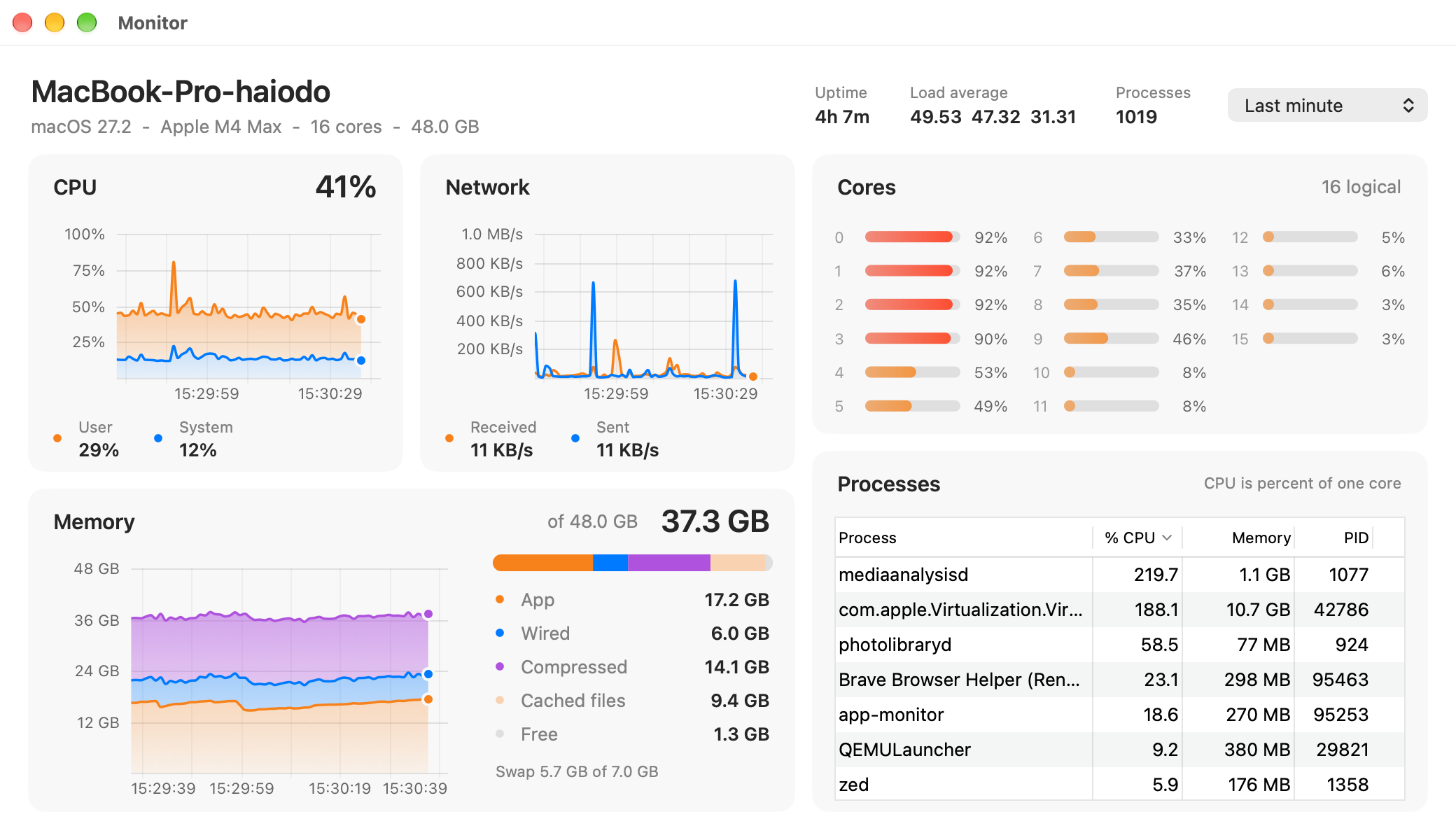
The same monitor on macOS, Windows, and Linux.
Here is the settings form from examples/apps/settings. It is an interface example with static data. The Account section in the screenshot is described like this:
gowt.Fields(gowt.GrowX(), gowt.Gap(gowt.Spacing.MD),
    gowt.Field("Display name", gowt.Text(gowt.Value("Alex Morgan"), gowt.GrowX())),
    gowt.Field("Email", gowt.Text(gowt.Hint("name@example.com"), gowt.GrowX())),
    gowt.Field("Password", gowt.Text(gowt.Password(), gowt.Value("secret-pass"), gowt.GrowX())))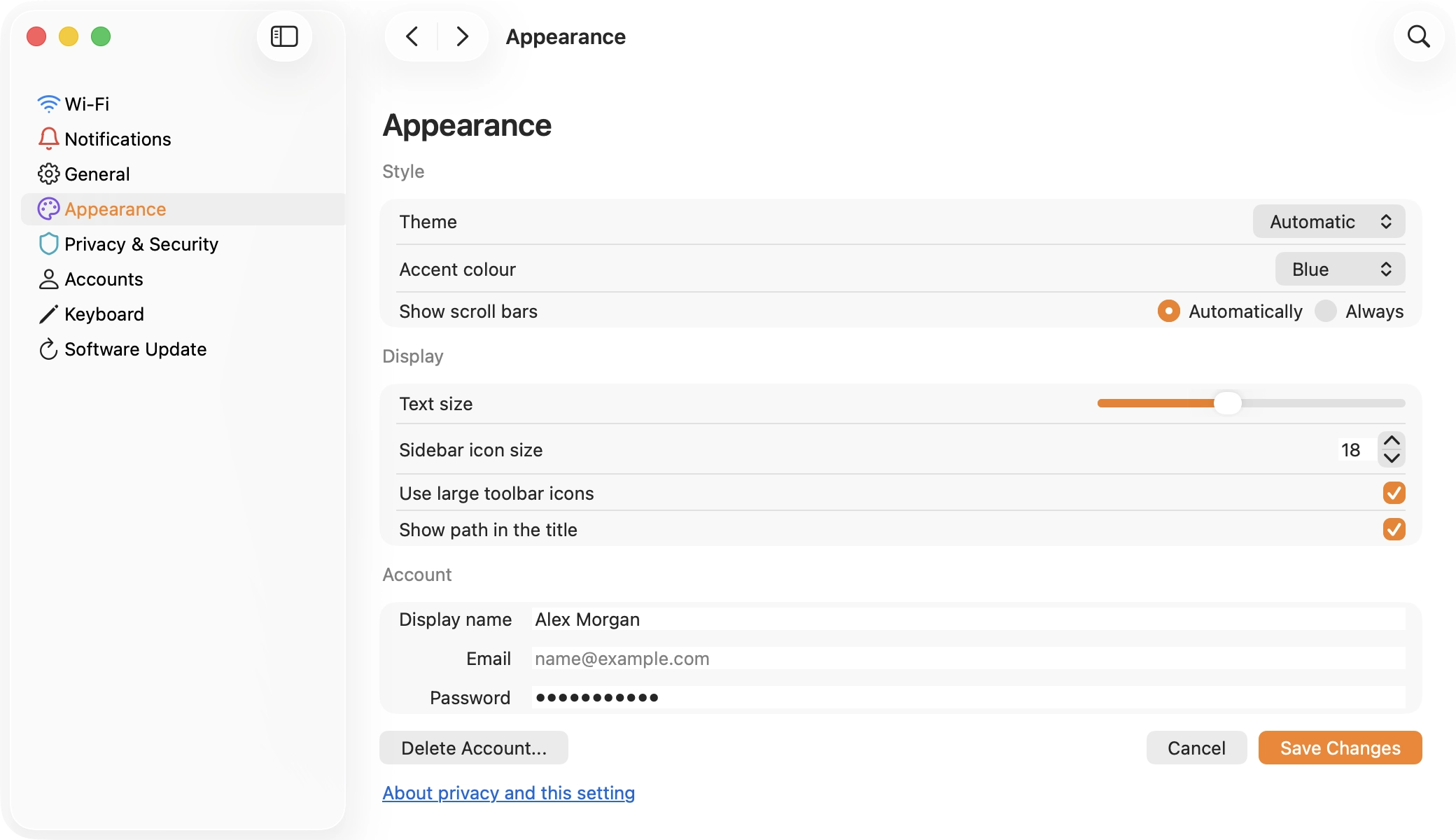
Updating tables and trees bind to state through Rows and Nodes. The bindings match entries by keys unique among siblings and retain selection for the remaining elements. Reordering recreates a row; moving a node to another parent creates a new node.
For background work there is Job with cancellation and progress; Track accounts for work by external libraries. Then returns a Job result to the UI thread; widgets are still accessible only from that thread. I will show rx reactive bindings and a QA application test in code below.
For HTML alongside native components, there are webview and Browser. They use WKWebView, WebView2, or WebKitGTK 4.1; the engine must be installed.
Update: v0.16.0
v0.16.0 came out on November 15. On macOS, window content can now span the entire client area beneath glass panes and the toolbar. Glass tint and new toolbar item positions are configurable.
gfx gained exact tile scaling and an opt-in direct rendering mode. Tiles remain faster for large scenes that pan more than they change. Tables gained first-cell editing, and Fit() on macOS now measures cell text correctly.
The example apps were run on macOS, Ubuntu 26.04 and Windows 11 arm64. The toolbar, glass and table editor checks have not yet been run on Windows and Linux.
How do you test all this?
Testing has three layers. First, j2go golden tests: a Java example is translated into Go, and the result and file set are compared with a reference.
Second, translated SWT JUnit tests. The runner compares the result with a baseline for the test environment, accounting for known fail, skip, and flaky results. A green check means there is no regression against that baseline.
These are the saved results for October 30. They count entries in baseline files; there was no new run:
| Environment | Total SWT | pass | fail | flaky | skip |
|---|---|---|---|---|---|
| macOS | 3894 | 3818 | 4 | 3 | 69 |
| Windows under Wine | 3894 | 3728 | 70 | 7 | 89 |
| Windows 11 arm64, UTM | 3894 | 3799 | 0 | 6 | 89 |
| Linux, Docker/Xvfb | 3901 | 3840 | 2 | 1 | 58 |
| Linux, GNOME/Wayland, UTM | 3901 | 3836 | 4 | 1 | 60 |
Do not add the platform counts together: they mostly cover the same checks, although the sets differ slightly.
There are another 87 tests for the ported part of JFace. On macOS they produce 86 pass and one skip. On Windows and Linux, there are 85 pass, one fail, and one skip.
The third layer is the project’s Go tests: ordinary checks, GUI tests, and QA-driver scenarios. I counted 861 functions of the form Test*(t *testing.T) in tracked *_test.go files using the Go AST, including all platform files and build tags, but excluding TestMain, benchmarks, and nested t.Run calls. This is a count of declarations in the source, not 861 tests that run and pass on every OS.
CI builds and runs vet for three operating systems on amd64 and arm64. Windows and macOS run ordinary Go tests; Linux in Docker/Xvfb runs SWT, JFace, Go, and GUI checks. GUI jobs on hosted Windows and macOS runners are separate and use continue-on-error: true, so their failure does not fail the whole workflow. The workflow definition alone does not show whether its latest run passed.
Almost like RCPTT
To test applications, I returned to the RCPTT idea: find a component, perform an action, wait for the system to settle, and check the result.
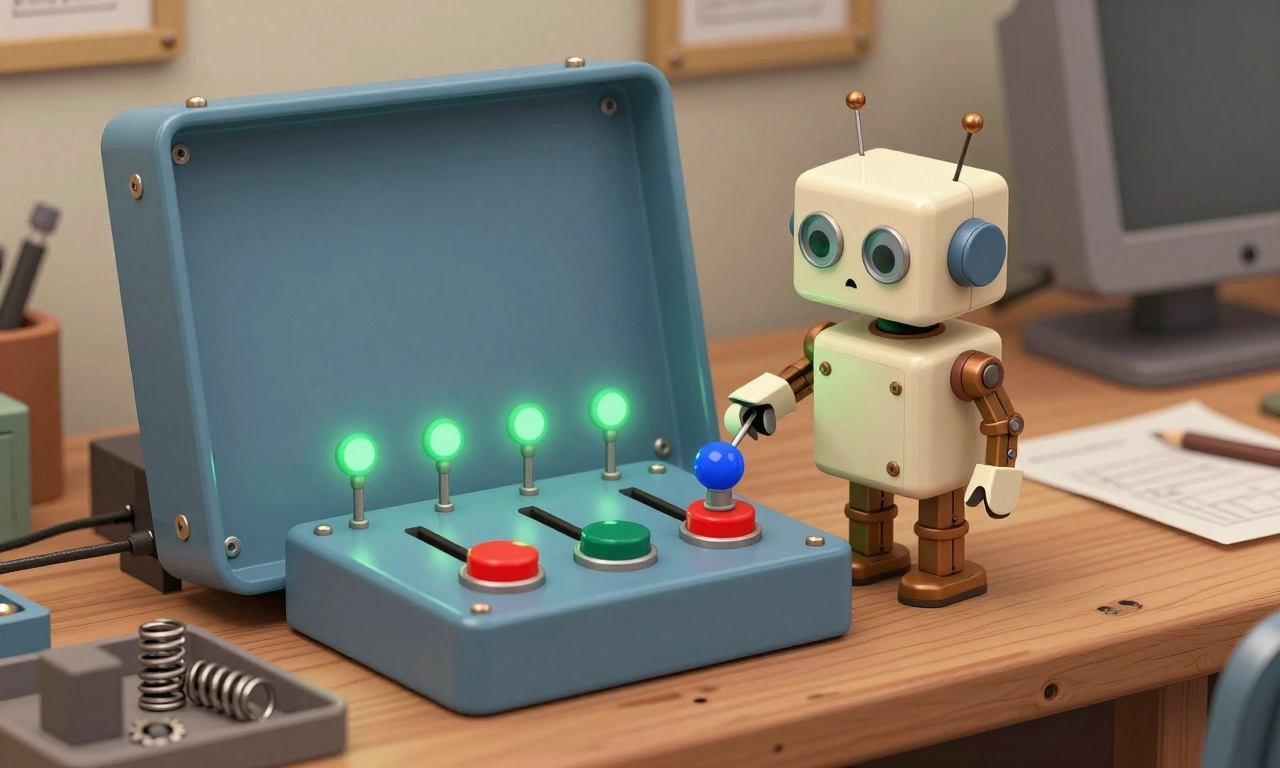
A QA build of the application gets a local server through -tags gowtqa. An ordinary go test starts it as a separate process and sends JSON commands over a socket. On Windows there is a fallback using loopback TCP with a token. A build without the tag has no server. The design is described in docs/qa.md.
Here is a shortened scenario from examples/qa/qa_test.go:
func TestGreet(t *testing.T) {
    app := qatest.App(t)
    app.Find(qa.ID("name")).Type("Ada")
    app.Find(qa.ID("greet")).Click()
    if got := app.Find(qa.ID("greeting")).Node().Text; got != "Hello, Ada" {
        t.Fatalf("greeting is %q", got)
    }
}
This is a fragment: it needs TestMain to build the app with the QA tag and pass the path to qatest.Main. The full version and the GOWT_GUI_TEST check are in the same source file. qatest.App(t) calls the reset handler; without it, state is not cleared automatically between tests.
After an action, settle waits for the UI queue to empty, Job and their Then callbacks to finish, Track calls to close, short timers, and two identical tree snapshots. The driver does not wait for ordinary go func(), background BackgroundJob, periodic Every, or After timers of one second or more.
Actions are semantic: Click fires an event even on a covered button, without an OS click. Dialogs receive prepared answers, and Shot saves an image without comparing pixels.
There is a QA protocol and a Go client for controlling components. A separate gowt-mcp is planned: an agent will explore a live application and record the scenario it followed as a Go test.
What already exists for Go?
Here is what I compared on October 30, 2026. I used Fyne v2.8.2, Gio v0.10.2, and the stable Wails v3.0.0. I looked at Walk’s repository sources and at andlabs/ui in its mid-alpha state, as its author calls it.
| Library | How the interface is built | Platforms and build |
|---|---|---|
| gowt | System AppKit, Win32, and GTK 3 through translated SWT | macOS, Windows, Linux. No cgo or C compiler; Linux needs GTK 3 |
| Fyne v2.8.2 | Its own widgets; the desktop driver draws using GLFW/OpenGL | Windows, macOS, Linux, BSD, Android, iOS. Desktop builds need a C toolchain and graphics development packages |
| Gio v0.10.2 | The application processes a frame; widgets create drawing operations for the GPU | Windows, macOS, Linux, mobile platforms, and WebAssembly. Windows without cgo; macOS needs Xcode, Linux needs a C toolchain and development packages |
| Wails v3.0.0 | HTML/CSS/JavaScript in the system WebView; Go services are available through a bridge | Windows, macOS, Linux. v3 needs Go 1.26+, platform tools, and libraries; mobile support is experimental |
| Walk | Win32 controls, including declarative descriptions using Go structs | Windows only. A Common Controls v6 manifest is required; no GitHub Releases have been published |
| andlabs/ui | Go wrapper around the libui C library with system controls | Windows, macOS, Unix with GTK 3. Requires cgo and a C toolchain; the package is described as mid-alpha |
For Fyne, see the desktop driver source, build requirements, and platform list. Gio documents its widgets and installation on different platforms. Wails documents v3 installation and the JavaScript-to-Go bridge. Walk’s requirements and manifest are in its README; the absence of releases is visible on Releases.
I will leave Bubble Tea separate: it is a terminal interface, not a desktop window library.
The same window, the same Quit
The Fyne example is quite short. This is a complete main.go for the same task: text and a quit button:
package main

import (
    "fyne.io/fyne/v2/app"
    "fyne.io/fyne/v2/container"
    "fyne.io/fyne/v2/widget"
)

func main() {
    a := app.New()
    w := a.NewWindow("Hello")
    w.SetContent(container.NewVBox(
        widget.NewLabel("Hello, Go"),
        widget.NewButton("Quit", a.Quit),
    ))
    w.ShowAndRun()
}
This builds on the official Hello example; a short example cannot measure API usability.
Gio exposes the event loop. The outer code creates an app.Window, starts event processing in a goroutine, and calls app.Main(). The full skeleton is in the official example; inside app.FrameEvent, the task looks like this:
gtx := app.NewContext(&ops, e)
if quit.Clicked(gtx) {
    return nil
}
layout.Flex{Axis: layout.Vertical}.Layout(gtx,
    layout.Rigid(material.Body1(theme, "Hello, Go").Layout),
    layout.Rigid(material.Button(theme, &quit, "Quit").Layout),
)
e.Frame(gtx.Ops)
Here ops has type op.Ops, and quit is a widget.Clickable; both live outside the loop. theme := material.NewTheme() is created there too. The fragment imports gioui.org/app, gioui.org/layout, gioui.org/op, gioui.org/widget, and gioui.org/widget/material. Returning ends the processing function; the outer code in the official single-window example then calls os.Exit(0). The button state is stored separately from its appearance.
Walk also has a declarative API. Inside main, with imports log, github.com/lxn/walk, and a dot import of github.com/lxn/walk/declarative:
var window *walk.MainWindow
_, err := (MainWindow{
    AssignTo: &window,
    Title: "Hello", Layout: VBox{},
    Children: []Widget{
        Label{Text: "Hello, Go"},
        PushButton{Text: "Quit", OnClicked: func() {
            if err := window.Close(); err != nil {
                log.Print(err)
            }
        }},
    },
}).Run()
if err != nil {
    log.Fatal(err)
}
This is a fragment, not a complete project: it needs the Windows manifest from the README, embedded in the exe or placed next to it as hello.exe.manifest. The APIs were checked against MainWindow.Run and FormBase.Close.
In Wails, part of the example is in Go and part in the frontend. For v3, create a project with wails3 init -n hello -t vanilla-js. In its frontend/src/main.js, the quit button looks like this:
import { Application } from '@wailsio/runtime';

document.body.innerHTML = '<p>Hello, Go</p><button id="quit">Quit</button>';
document.getElementById('quit').addEventListener('click', async () => {
    await Application.Quit();
});
The Go shell and frontend build remain from the project template; quitting calls the v3 runtime. Go data is available through bindings for a registered service. Some interface code remains in JavaScript.
What if a number changes?
In gowt I have the rx package. Inside gowt.Run, a counter can be bound to a label like this. The example above also needs the strconv and github.com/haiodo/gowt/rx imports.
count := rx.New(0)
label := rx.Compute(func() string { return strconv.Itoa(count.Get()) })
w := app.Window("Counter",
    gowt.Label("", gowt.BindText(label)),
    gowt.Button("+1", gowt.OnClick(func() {
        count.Set(count.Get() + 1)
    })))
w.Show()
The dependency is expressed in rx.Compute: count changes, the string is recomputed, and the label updates.
In Fyne, the same counter only needs to update the existing label. Add strconv and replace SetContent from Hello:
count := 0
value := widget.NewLabel("0")
w.SetContent(container.NewVBox(
    value,
    widget.NewButton("+1", func() {
        count++
        value.SetText(strconv.Itoa(count))
    }),
))
SetText updates the widget without a separate Refresh. For one counter, the binding is longer; it is more useful when several elements read the state. Fyne also has data binding.
For gowt, I wanted system widgets, a Go description of the form, and builds without cgo. Walk and andlabs/ui already provide native GUI interfaces. What distinguishes gowt is translated SWT and runtime binding to OS libraries. On Linux, that still requires GTK 3.
I checked the alternative examples against documentation and source, but I did not compile or run them for this comparison.
–
The library is still very rough, but I am improving it little by little by building side projects and finding bugs. Windows and Linux are not yet well covered, but I am already planning several useful applications I need, without which development can sometimes become a chore. I will tell you about them later.